
For developers: make your website work inside iCar
iCar is the home screen of the Tesla browser. When a tile points to a site that allows it, iCar opens the page inside iCar, under a header with a Back button, instead of sending the driver out of the app. Here is what your site needs, and how to get listed.
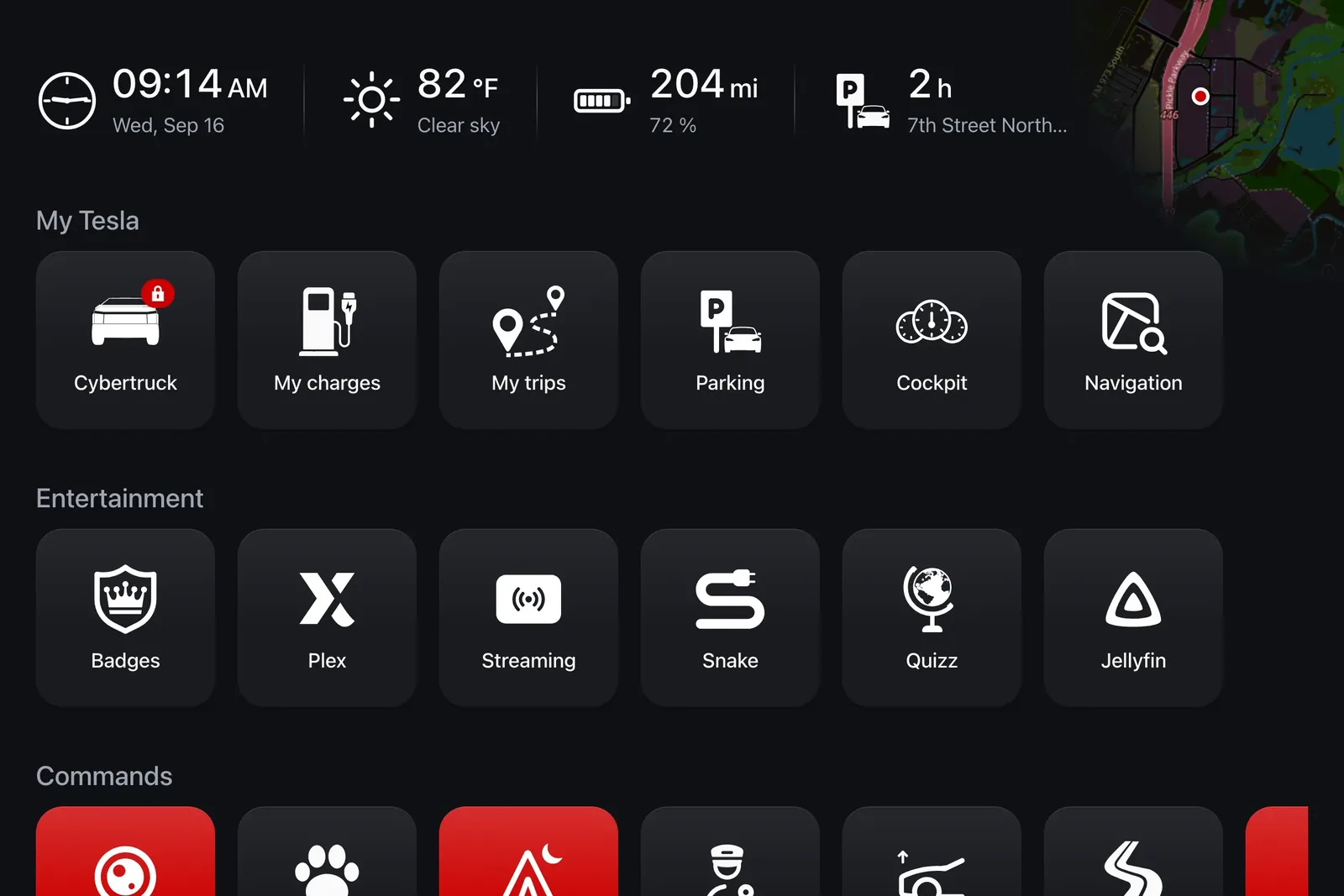
How iCar displays your site
Your page is loaded in an iframe, across the full width of the car screen, under a thin iCar header showing your site's name and a Back button.
iCar shows your page as is: your header, menus and consent banners stay visible. Nothing inside a page from another domain can be hidden or restyled.
If your site refuses to be framed, the tile still works: it opens your site in the Tesla browser, outside iCar.
Allow iCar to frame your pages
Browsers refuse to display a page inside another site unless the page allows it. Two HTTP headers control this.
Remove X-Frame-Options (DENY or SAMEORIGIN), at least on the pages you want to offer.
Allow iCar in Content-Security-Policy with the frame-ancestors directive: Content-Security-Policy: frame-ancestors 'self' https://geticar.com
If you already send a Content-Security-Policy, add https://geticar.com to your existing frame-ancestors list instead of sending a second header.
nginx example: add_header Content-Security-Policy "frame-ancestors 'self' https://geticar.com" always;
To check your headers: curl -sSLI https://your-site.com | grep -i 'x-frame-options\|content-security-policy'
Design for the car screen
Size: the Tesla browser is landscape, roughly 1,180 × 600 CSS pixels, and narrower (about 770 pixels) on recent software. iCar's header takes the top of the screen: aim for a layout that works from 768 pixels wide.
Touch only: no mouse and no hover. Menus, tooltips and actions must work with a tap, with touch targets of at least 44 pixels, ideally 64: the screen is used at arm's length, often in a moving car.
Readable in sunlight: large text, strong contrast, and a dark theme through prefers-color-scheme.
Draw your icons: the Tesla browser's fonts don't cover many Unicode symbols. A cross, an arrow or a check mark typed as a character may show up as an empty box: use SVG icons.
HTTPS everywhere: any http:// image, script or stream is blocked as mixed content.
Keep it light: the car is often on a cellular connection, and a heavy page feels like a frozen screen. Your consent banners stay visible: make them closable with one large tap.
Sessions, cookies and sign-in
Inside a frame, your site is a third-party context: browsers partition or block third-party cookies, and a sign-in that works in a tab may not persist inside iCar.
The best experience is content that works without signing in. If you need a session, set your cookies with SameSite=None; Secure; Partitioned, and check that it survives a reload.
Avoid sign-in flows that open a pop-up or a new tab: they leave iCar.
Audio and video
Use H.264 video and AAC or MP3 audio: HEVC may not be decoded.
The Tesla browser (Chromium) has no native HLS support: use a library such as hls.js. Protected content (Widevine) is not guaranteed to play.
No autoplay with sound: the browser blocks it until the user taps the page. And design video for parking or charging, not for driving.
What the iCar frame never allows
A page opened inside iCar has no access to geolocation, the camera, the microphone or full screen. This is a deliberate and permanent choice: iCar grants none of these permissions to a third-party site. Design your page to work without them.
Privacy: iCar sends you nothing
iCar sends your site no personal data and no location. The address opened is exactly the one on the tile: iCar adds no identifier, no account information and no coordinates, and sends none in any other way.
The referrer is reduced to the origin, https://geticar.com: you can measure traffic coming from iCar, without learning anything more about the person.
As with any website, your server sees the IP address of the connection, the car's cellular or Wi-Fi network. It comes from the browser, not from iCar.
Get listed in iCar
iCar only opens verified domains inside the app, so a driver never sees an empty frame. Email support@geticar.com with: the address to open, a square SVG or PNG logo of at least 256 × 256 pixels on a transparent background, the name to show on the tile, the countries and languages your site serves, and one sentence on what drivers can do with it.
We check your headers, then actually load your page inside iCar. Once validated, your domain opens inside iCar for every user who adds it, and can be suggested in the default tiles for the relevant countries.
Ready to try? The bookmark grid is free, with no time limit.
Download